HAND LETERRING

Step 1
Just as we did in the previous Script-Lettering tutorial, we're going to write down a bunch of phrases/quotes that we might choose to draw. I recommend something that resonates or has meaning to you because it then becomes more personal and enjoyable to draw. I am going to select the words, "New York City", because in a short while, I'll be moving there—it seems fitting for me to draw this at this time. But, for you, select something that means something to you. Have fun with it!
Step 2
Now that we have our phrase selected, let's move onward to conceptualizing some lockups for that type. Using a pencil and paper, quickly sketch out as many ideas as you can to somehow fit the words together nicely. Maybe you could use an alternating baseline, flourishes, etc.—anything and everything you can think of to form a nice composition.Remember: sketch small and fast—this way you save time and create a wide variety of options without taking into consideration how all the letterforms look. Later on we will finesse the letterforms to appear exactly how you want them. For now, we're just worried about composition and forming the "skeleton" of our lettering.

Step 3
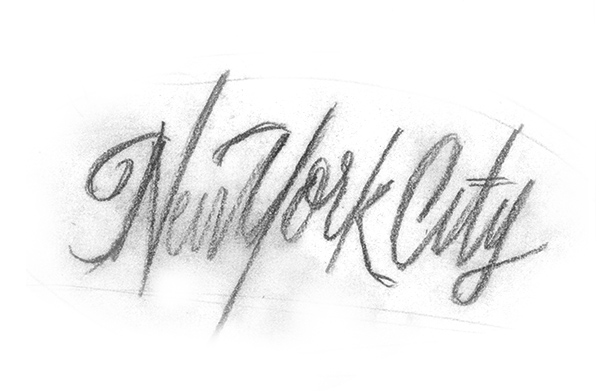
After conceptualizing some type lockups, select one of them that you think is working best to move forward with. Next, use a copy machine or scanner and enlarge that piece of lettering so you can fine-tune the details. For the lettering I selected below, I scanned it into the computer and enlarged it enough to fit on a 8.5" x 11" piece of printer paper.The enlarged piece of lettering you just created is considered the "skeleton" or the framework for what's to come. We will be using this as a guide when we begin using the Tombow Brush-Pen.
Step 4
Now that your skeleton (framework) is good to go, let's throw a piece of tracing paper on top and get to work. Begin by redrawing your lettering with your brush-pen. Pay attention to angle, letter-spacing, overall color, stroke endings, etc.
Step 5
Next, we will begin to refine, refine, refine until perfection. At this point, take your previous lettering and place another piece of tracing paper on top. Try to fix things that might be bothering you. For me, I'm trying to develop an alternating baseline with the letterforms as well as fix some kerning issues. I'm looking to make this piece more lively and give it some flow.
Step 6
Continuing further, keep tracing and retracing your letters until you reach a solid foundation. Fix your kerning issues and angles (so they're all uniform and consistent), and make sure your connections are smooth and high-waisted. Keep drawing the phrase over and over until it's ready to move onto the next stage: pencil.
Step 7
We've now reached the point where we can take our brush-drawn lettering and begin redrawing the lettering with pencil to perfect connections, stroke endings, and any other problem areas. As you can see with the below photo, I'm still working out some kerning issues from the previous step.
Step 8
We've reached the end! I've fixed a lot of the minor problem areas and finessed the lettering to my liking. Begin to fill in your finished piece of lettering with pencil so you can truly see the positive and negative space. If need be, begin to trace your lettering once or twice more until it reaches its final stage.From the process .gif below, you can see that lettering sure is a long and lengthy process to really perfect. These things take time!


4. Angular Brush Script
Let's now begin the same basic process/concepts, but instead of rounding our connections, we're going to make them very flat and angular. For this piece of lettering, you may either utilize the same phrase as before, or choose a new one. But I'll be using "New York City" again so you can see just how easy it is to create an entirely different piece of lettering while utilizing exactly the same tools.Let's get started!
Step 1
Beginning in exactly the same way as before, quickly sketch out various ways to draw your phrase. When you draw your letterforms very quickly, sometimes unique characteristics with your letters can occur, things you wouldn't normally draw when you're slowly thinking about what you're drawing. Jot down as many lockups as possible before selecting a final to progress further with.Again, don't worry about what it looks like—we'll make it look more polished and complete through the process.
Step 2
After conceptualizing type lockups, select one of them that you think is working best to move forward with. Next, use a copy machine or scanner and enlarge that piece of lettering so you can fine-tune the details. For the lettering I selected below, I scanned it into the computer and enlarged it enough to fit on a 8.5" x 11" piece of printer paper.Let's now use this skeleton and complete the same process as we did with the roundhand brush-script.

Step 3
Just as you did before, get out your Tombow Brush Pun or Copic Marker and begin tracing your skeleton. This time, pay attention to the connections and angles of the joints of your letterforms. We're going to be making them harsher and flatter this time around.
Step 4
Moving onward, take your Step 3 lettering and begin tracing on top of it to correct any mistakes you have made. This time, I'm fixing the angles, slope, connecting points, and stroke endings to be flatter and more drastic.
Step 5
I believe we're nearing the point where we can continue further with pencil. Trace and retrace your brush-lettering until you're happy with where it's heading. If the composition, spacing, color, etc., are looking good, let's begin redrawing with pencil!
Step 6
At this point, you should have an early rough pencil sketch with filled in letterforms to see how the color is working throughout. You know the drill—keep redrawing your phrase to perfect the problem areas. As you can see in the below sketch, I'm fixing kerning issues, alternating my baseline again, and correcting some stroke endings/angles.We're almost there! Keep on redrawing. It'll be worth the patience and persistence, I promise!

Step 7
This is it! Begin to redraw your lettering more precisely and cleanly because you're coming in for the home stretch.Alright guys, there we have it—a finished piece of lettering. After many edits, I think I've achieved an even color, nice composition, and consistent angles and stroke weights.
But I think I'm going to take it one step further to make it a bit more "custom" in the next step.

Step 8
Taking the lettering you just finished, you can do as I've done below and remove a bit of weight from the entry and exit strokes of your letters. I've made minor "cuts" into the lettering to remove a bit of weight and lighten the load on these rather heavy brush-strokes.Seeing the whole process from start to finish is always cool. I've provided a .gif for your viewing pleasure. You should now be able to see the start and finish of your lettering project—always a treat to see the progress you've made!


Conclusion
Brush-script sure is a challenge! It took me a good while to grasp the ins and outs. Don't get discouraged if you're lettering isn't turning out the way you want it to. After a good amount of practice, you'll be well on your way to creating some jaw-dropping custom brush-script lettering. If you have any questions at all, feel free to post below and I'll be able to help you out. Good luck!
HAND LETERRING
![HAND LETERRING]() Reviewed by Unknown
on
10.09
Rating:
Reviewed by Unknown
on
10.09
Rating:


Tidak ada komentar: